Important: IdenTrust is a separate, third-party identity verification provider that operates independently from Stavvy. Stavvy does not have access to your IdenTrust account, login credentials, or personal information stored with IdenTrust.
Notaries who wish to use Stavvy must have an IdenTrust certificate added to their profile, or they will not be able to conduct closing and signing meetings.
If you haven't already purchased your IdenTrust certificate, go to: identrust.com/partners/stavvy.
- Click Buy Now
- From the Please Choose a Certificate field, select IGC Notaries Basic Assurance | Individual Identity | Software Storage
- Choose the purchase term: 1 Year, 2 Years, or 3 Years.
- Click Continue
- Click Continue again.
- If you purchased the certificate from the National Notary Association (NNA), enter the voucher number in the Voucher field. You should have received an email from NNA with the voucher number.
- Click Next.
- This should bring you to the Your Information page. IdenTrust will use this information to verify your identity. This should be your personal information, not your work address, etc.
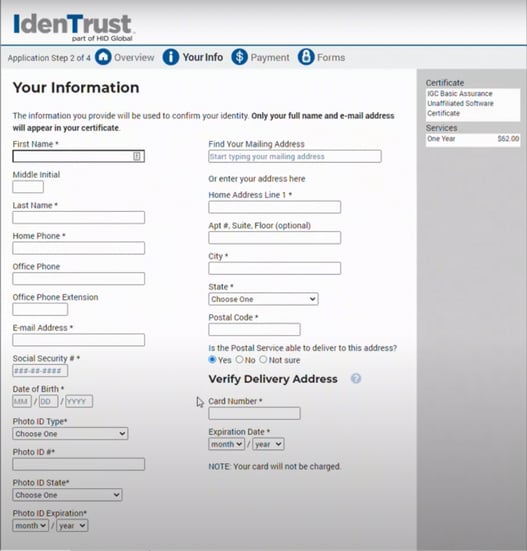
- Create an Account Password and Security Questions.
- Click Next.
- Confirm that your information is correct, then click Yes.
- Select a Payment type.
- Once your payment goes through, you will receive an email from Identrust to verify your email address.
- Once your email is verified, you will receive a second email confirming payment.
- IdenTrust will complete ID proofing measures to confirm your identity. Once that's finished, you will receive an approval email. This email will contain login instructions to download your new certificate.
To download the digital certificate, follow these steps based on your operating system:
If you have any questions about your certificate, please reach out to IdenTrust directly:
Phone: 1 (888) 339-8904
Email: Support@IdenTrust.com
Help Center: Click here
Comments
0 comments
Please sign in to leave a comment.